
An AAA server is central to how users and devices access your network. Operating it involves configuring policies, connecting authentication backends, monitoring activity and investigating problems. A well-designed user interface makes those tasks easier across the team.
With Radiator 10, the UI brings configuration, validation and operational visibility together. It helps people get started, supports routine administration and gives specialists the flexibility to handle complex requirements.
Full configuration power, enhanced by tools you actually use
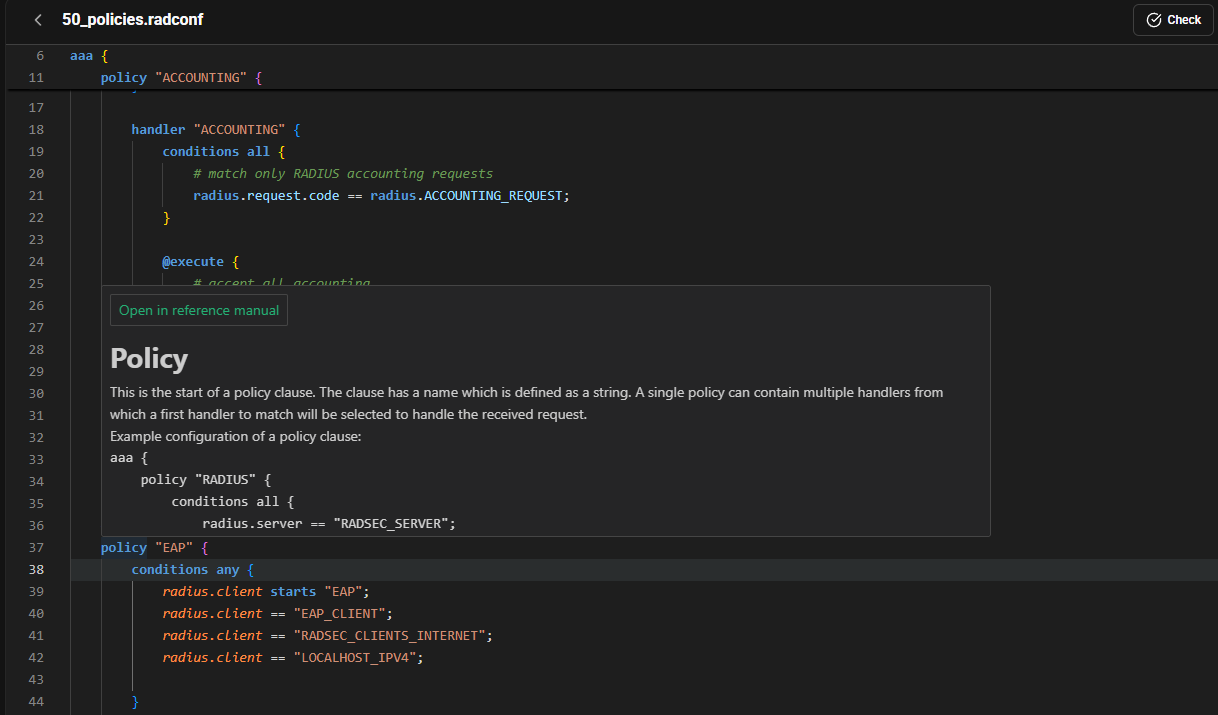
An AAA configuration needs to reflect the requirements of your network. Those requirements can range from straightforward authentication to detailed policies and integrations with several backend systems.
The Radiator UI configuration editor gives users the full expression power of the Radconf configuration language. Alongside that flexibility, it provides auto-completion, suggested inputs and syntax highlighting. Tooltips draw on the versioned reference manual, bringing documentation directly into the editing experience.
These features help at every experience level. Someone learning the configuration can explore available options and check their meaning. A regular administrator can spend less time looking up details. A specialist can work on complex policies with useful guidance close at hand.
For recurring tasks, Radconf policy templates provide forms for deployment-specific information. Teams can also turn existing configurations into reusable templates, making established approaches easier to share and repeat.
A smoother process for making changes
A configuration change needs a clear path from the first edit to deployment.
Radiator’s UI saves edits into a pending configuration, allowing users to review and check changes before applying them. The syntax checker validates an individual file, while the full configuration check loads the configuration and attempts a dry run. This helps identify issues such as missing referenced files, invalid backend configurations and certificate problems without stopping or restarting the running server.
The deployment dialog also enables configuration backup by default. Previous backups can be restored into the pending configuration, reviewed and deployed when ready. Having these steps available in the same interface makes a deliberate change process easier to follow in everyday work.
Better visibility into daily operations
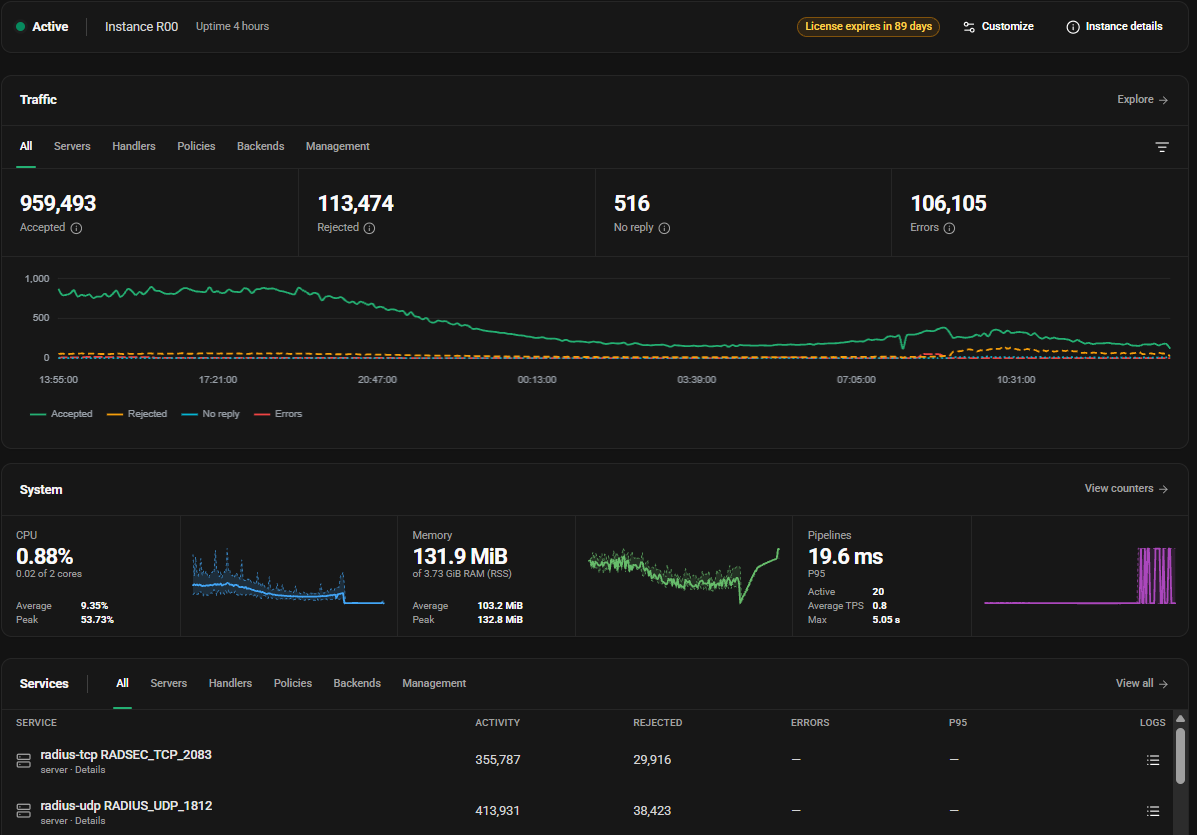
Once an AAA service is running, teams need to understand what it is doing. When connection problems arise, accessible operational information provides a useful starting point.
Radiator’s dashboard displays server statistics, with graphs that can be filtered by handler. Counters provide detail on requests, responses, accepts, rejects and latency. The UI also displays authentication, accounting and application logs, with filtering, search and tracing tools.
For example, a team investigating failed connections could examine the relevant handler’s counters and then filter authentication logs to narrow the investigation. Bringing these views together can help operators move from a reported symptom to a more focused investigation.
The same visibility is useful during routine operation: checking service behaviour after a change, reviewing activity or sharing findings with colleagues.
Support the whole team
AAA operations involve people with different responsibilities. Some need to monitor service health. Others need to inspect configuration or make changes.
Radiator UI support s privilege levels for monitoring, configuration read access and administration. Teams can give colleagues access appropriate to their work, allowing more people to investigate and understand the service while controlling who can modify it.
Combined with documentation in the editor and reusable templates, this can make onboarding and handovers easier. Operational knowledge becomes more accessible, and established workflows become easier to follow.
A good UI adds value to your deployment, gives you all the expression power while saving you time at every turn. It helps teams configure with precision, deploy changes deliberately and understand what is happening in operation. Radiator brings those benefits together while keeping the full power of its configuration language available.
Want to know more?
Whether you are looking for a greenfield RADIUS deployment, or are an experienced networking professional looking for a state of the art AAA server, Radiator has the tools to make your deployment easier to manage.
For more information about the Radiator 10 products, please see the related product pages for Radiator Policy Server and Radiator Core.
For any questions or to schedule a demo, please contact sales@radiatorsoftware.com